
Playspace
Your play space is where SteamVR thinks your room is. When the floor is a few centimetres off, or the game spawned you facing a wall, or you want to sit somewhere the room setup never covered, this page moves it — without leaving VR and without touching SteamVR’s saved room setup.
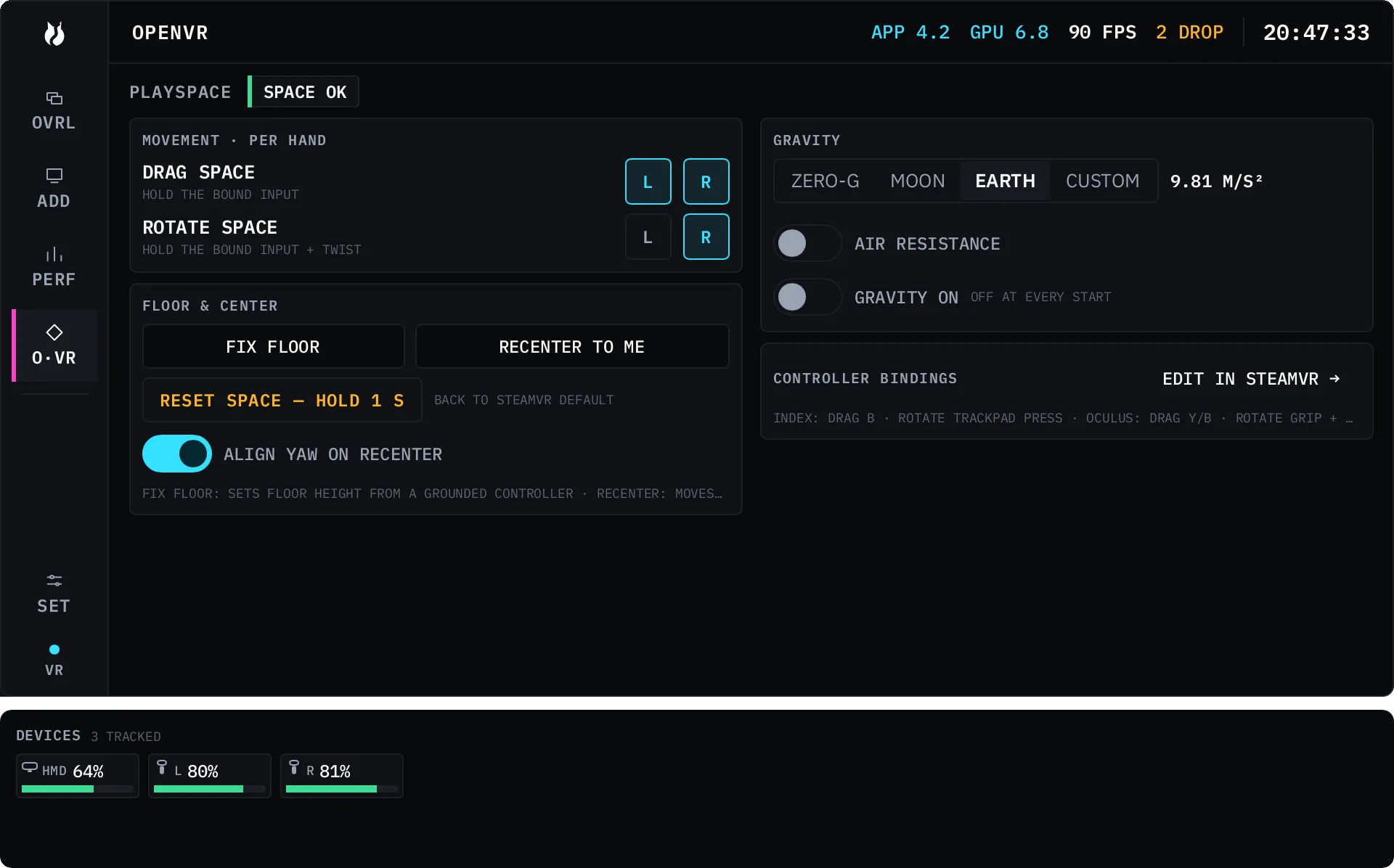
Open the Dash, pick O·VR, and you are on PLAYSPACE. A chip in
the page header says SPACE OK while your space is still where SteamVR put it
and SPACE MOVED once you have adjusted it.
Everything on this page is one offset that vrOS owns. It never overwrites SteamVR’s own zero pose, and RESET SPACE puts the offset back to nothing.
Turn on a hand first
Section titled “Turn on a hand first”Nothing moves your space until you say which hand may move it. MOVEMENT · PER HAND has two rows with an L and an R chip each, and all four are off by default.
| Row | What it does while the bound input is held |
|---|---|
| DRAG SPACE | Move your hand and the space comes with it |
| ROTATE SPACE | Twist your wrist and the space turns |
Off is the default because a feature that can strand you in the middle of your own room should be something you asked for. Grabbing an overlay panel never moves your space, and a space drag never grabs a panel — the two are separated deliberately.
Which button
Section titled “Which button”vrOS ships default bindings; SteamVR owns them from there.
| Controller | Drag | Rotate |
|---|---|---|
| Index | B on that hand | trackpad click, inner edge |
| Oculus Touch | Y (left) / B (right) | grip plus that same button |
| Vive wands | bind it in SteamVR | bind it in SteamVR |
On the Index defaults there are also two chords, both needing both hands so they cannot happen by accident: reset is both trackpads clicked on their outer edges, gravity is both clicked north.
To change any of it, use EDIT IN STEAMVR → on the page. It opens SteamVR’s own binding UI on vrOS’s action set, in the dashboard, without taking the headset off. Per-game binding presets are not in this build.
FIX FLOOR
Section titled “FIX FLOOR”This sets floor height from a controller resting on your actual floor.
- Press FIX FLOOR. An amber strip appears:
PLACE EITHER CONTROLLER ON THE FLOOR · OTHER TRIGGER CONFIRMS · GRIP CANCELS. - Put one controller flat on the floor. The lower of the two is the one being measured, so it does not matter which.
- Pull the trigger on the other controller. That pull is consumed by the confirm, so it will not click whatever the laser happened to be pointing at.
- A toast reads
FLOOR FIXED · UNDO. Press UNDO within ten seconds if it went wrong.
Squeeze either grip to cancel instead. If you walk away, the armed state cancels itself after 30 seconds.
RECENTER TO ME
Section titled “RECENTER TO ME”Press it once and the centre of your play space comes to where you are
standing. It is instant, and a RECENTERED · UNDO toast gives you one step
back.
It moves you horizontally only. Your height is not touched — that is FIX FLOOR’s job, and mixing the two is how a recenter ends up sinking you into the floor.
ALIGN YAW ON RECENTER is a toggle next to it, on by default. On, the space also turns so you face its forward, which is what SteamVR’s own recenter does. Off, only the centre moves and your facing is left alone.
RESET SPACE
Section titled “RESET SPACE”RESET SPACE — HOLD 1 S puts everything back to SteamVR’s own origin for this session: drag, rotate, gravity, floor fix and recenter are all the same one offset, and this zeros it. Hold the button for a full second, so it cannot happen on a stray click. There is no undo, because reset is the undo.
Gravity
Section titled “Gravity”Turn GRAVITY ON and your play space becomes something you can throw. Let go of a drag with motion behind it and the space carries the throw, falls under the acceleration you picked, and settles on the floor.
| Preset | Acceleration |
|---|---|
| ZERO-G | 0.01 m/s² |
| MOON | 1.62 m/s² |
| EARTH | 9.81 m/s² |
| CUSTOM | your own, 0.00 to 50.00 m/s² |
AIR RESISTANCE decays horizontal momentum while you fall. The preset and that switch are settings and persist; GRAVITY ON does not — it starts off every time vrOS attaches, because waking up mid-fall after a restart is not something anyone wants.
What survives a restart
Section titled “What survives a restart”| What happened | Your adjusted space |
|---|---|
| vrOS restarted, SteamVR stayed up | kept, exactly where it was |
| The compositor crashed and came back | kept, exactly where it was |
| SteamVR restarted | cleared, back at SteamVR’s origin |
| You re-ran room setup or reset the standing position | vrOS re-bases on the new origin |
RESET always lands on SteamVR’s origin, whichever of those happened.